Instructions for Presenters (On-Site)
Important Information for Oral Presentations
To ensure a smooth session, please follow the instructions below. The overall time slot for each presentation ranges from 15 to 20 minutes, depending on the number of presentations in each session. Plan your speech to allow at least 3 minutes for questions and discussion. Session chairs have been instructed to rigorously enforce the schedule, i.e., to strictly adhere to the duration of each presentation. We kindly ask for your understanding and cooperation in keeping the schedule. Be in the session room 15 minutes before the session starts so you can meet your session chairs and the other speakers in advance. There will be a volunteer in every room for assistance. Presenters can check the presentations in the Speakers Preview Room.
Presentation Upload Instructions
- The organisation will provide a cloud system where all presentations should be uploaded in advance. The link will be shared via email with all the presenters.
- We strongly recommend sending slides before May 24th to avoid the last-minute queue in the speaker’s room. The cloud system will be available until May 24th.
- During the conference, presentations can be uploaded to the system in the Speakers Preview Room eight hours before the session. In this case, please bring your presentation on a USB stick.
- Each session room will be equipped with a laptop connected to the projector and sound system. This laptop will have the same specifications as the computers in the Speakers Preview Room.
Speakers’ Preview Room Opening hours:
- Tuesday June 2: 08.00-18.00
- Wednesday June 3: 08.00-18.00
- Thursday June 4: 08.00-18.00
- Friday June 5: 08.00-12.00
In order to avoid any problems with your presentation, please make sure it fulfils the corresponding requirements, and read carefully the instructions below.
PowerPoint Instructions
- If preparing your presentation in MS-PowerPoint, it is recommended that you use the versions compatible with Office 365 to guarantee that it will be opened successfully on the on-site PC.
- We recommend you to save your PowerPoint presentation using PPT or PPTX format instead of PPS.
- It is also possible to use Adobe PDF format.
- The usage of other file formats is not allowed.
Pictures/Videos
- JPG images are the preferred file format for inserted images.
- Images inserted into MS-PowerPoint are embedded into the presentations. There is no need to use images with dpi setting higher than 200 dpi, as these will only increase the file size of your presentation and have hardly any impact on the visual quality during presentation.
- We cannot provide support for embedded videos in your presentation; please test your presentation with the on-site PC several hours before your presentation.
- In case your video is not inserted in MS-PowerPoint, it is possible to have it in other formats – MPEG 2, 4 , AVI (codecs: DivX, XviD, h264) or WMV. Suggested bitrate for all mpeg4 based codecs is about 1 Mbps with SD PAL resolution (1024x576pix with square pixels, AR: 16/9).
Fonts
- Only fonts that are included in the basic installation of MS-Windows will be available (English version of Windows). Use of other fonts not included in Windows can cause wrong layout/style of your presentation.
- Suggested fonts: Arial, Times New Roman. If you insist on using different fonts, these must be embedded into your presentation by choosing the right option when saving your presentation:
- Click on “File”, then “Save As”
- Check the “Tools” menu and select “Embed True Type Fonts”
Instructions for Posters
As a Poster Presenter, you have the responsibility of capturing the interest of the attendees to the work you are showing. The quality of your presentation directly affects the interest your audience will have on your material, and the overall satisfaction the community will have on the conference.
We would like to call your attention to the following.
Preparing your poster:
- Posters need to be printed in advance by you as a presenter. We do not offer screens for digital presentation. Please print the poster in advance since on-site printing is not provided.
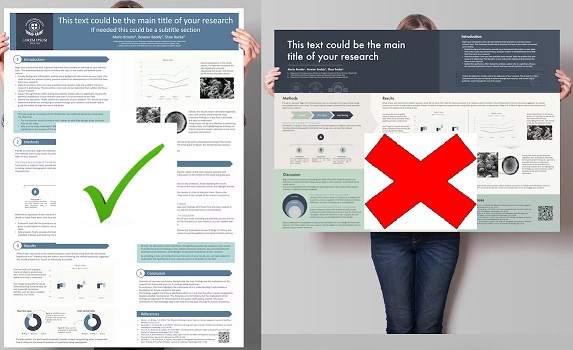
- Posters should be regular A0 portrait-orientation size (84.1 cm x 118.9 cm). We do not provide an official template of posters.
- Please use EuCNC logos for proper branding of the poster. You can download them here .
- Use an appropriate font size allowing posters to be readable by attendees 1.5 m away. The poster message should be clear and understandable even without oral explanation.
Presenting your poster:
Poster Sessions will take place on the ground floor of the Conference Venue. We have volunteers who can guide you to the place.
Poster sessions will be announced in the Programme.
Please check which session your poster has been assigned to, and the number of your poster.
- At the venue, each poster board is marked with an assigned poster reference number. Authors are required to use only the boards corresponding to their posters.
- We will provide the necessary material to attach the poster to the boards. Staples, pins, screws or any abrasive or perforating hardware are not permitted. Do not write or paint on the poster boards.
- Posters can be displayed for the entire day your session belongs to. Please remember to remove your poster at the end of the day. Otherwise, we will collect it for you. The collected posters will be available for you by the end of conference; if they are not collected, they will be disposed of. We do not offer sending of the left posters to any location.
- Authors are required to stand by their posters during the whole session dedicated to their posters, but they are also encouraged to be available for discussions during the day.
- For any support required please visit the Speakers Preview Room.